mirror of
https://github.com/csd4ni3l/logical-signals.git
synced 2026-01-01 12:33:46 +01:00
Compare commits
2 Commits
latest
...
3584f9c08a
| Author | SHA1 | Date | |
|---|---|---|---|

|
3584f9c08a | ||
|
|
41a493e44d |
20
README.md
20
README.md
@@ -1 +1,21 @@
|
||||
Logical Signals is a game where you have to direct and change signals with logical gates to meet the end result.
|
||||
|
||||
Demo video:
|
||||
[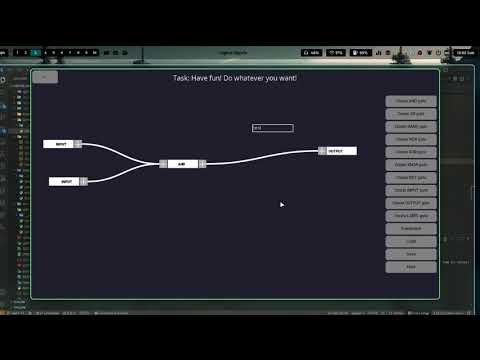](https://youtu.be/OPEPoMZabS4)
|
||||
|
||||
# How to play:
|
||||
- You can move gates by dragging their buttons (not the plus ones)
|
||||
- To create connections, click on the + buttons (left for input, right for output)
|
||||
- To remove connections, right click the connnection line
|
||||
- On levels, a node has to have 2 inputs(Except the OUTPUT and NOT node), but only 1 output
|
||||
- On DIY mode, a node can have more than 2 inputs, except for OUTPUT and NOT
|
||||
- You can change an INPUT's gate value by clicking on it
|
||||
- You have to connect the nodes in a way to meet the required result
|
||||
|
||||
# Logical Gates explanation:
|
||||
- AND: Returns 1 if all inputs are 1, otherwise 0
|
||||
- OR: Returns 1 if any inputs are 1, otherwise 0
|
||||
- NAND: Returns 1 if any inputs are 0, otherwise 0
|
||||
- NOR: Returns 1 if all inputs are 0, otherwise 0
|
||||
- XOR: Returns 1 if atleast 1 input is different, otherwise 0
|
||||
- XNOR: Returns 1 if all inputs are the same, otherwise 0
|
||||
95
game/play.py
95
game/play.py
@@ -17,6 +17,8 @@ class LogicalGate(arcade.Sprite):
|
||||
self.input: list[LogicalGate] = []
|
||||
self.output: LogicalGate | None = None
|
||||
|
||||
self.calculate_value()
|
||||
|
||||
def calculate_value(self):
|
||||
if self.gate_type == "OUTPUT" and self.input:
|
||||
self.value = self.input[0].calculate_value()
|
||||
@@ -357,54 +359,55 @@ class Game(arcade.gui.UIView):
|
||||
|
||||
gate: arcade.gui.UIInputText
|
||||
for gate in self.gates:
|
||||
if scroll_y == 1:
|
||||
gate.scale(1.1)
|
||||
else:
|
||||
gate.scale(1 / 1.1)
|
||||
if gate.gate_type == "LABEL":
|
||||
if scroll_y == 1:
|
||||
gate.scale(1.1)
|
||||
else:
|
||||
gate.scale(1 / 1.1)
|
||||
|
||||
if gate.width < self.window.width / 18:
|
||||
gate.doc.set_style(
|
||||
0,
|
||||
len(gate.text),
|
||||
dict(font_name="Roboto", font_size=7, color=gate._text_color),
|
||||
)
|
||||
elif gate.width < self.window.width / 16:
|
||||
gate.doc.set_style(
|
||||
0,
|
||||
len(gate.text),
|
||||
dict(font_name="Roboto", font_size=9, color=gate._text_color),
|
||||
)
|
||||
elif gate.width < self.window.width / 14:
|
||||
gate.doc.set_style(
|
||||
0,
|
||||
len(gate.text),
|
||||
dict(font_name="Roboto", font_size=11, color=gate._text_color),
|
||||
)
|
||||
if gate.width < self.window.width / 18:
|
||||
gate.doc.set_style(
|
||||
0,
|
||||
len(gate.text),
|
||||
dict(font_name="Roboto", font_size=7, color=gate._text_color),
|
||||
)
|
||||
elif gate.width < self.window.width / 16:
|
||||
gate.doc.set_style(
|
||||
0,
|
||||
len(gate.text),
|
||||
dict(font_name="Roboto", font_size=9, color=gate._text_color),
|
||||
)
|
||||
elif gate.width < self.window.width / 14:
|
||||
gate.doc.set_style(
|
||||
0,
|
||||
len(gate.text),
|
||||
dict(font_name="Roboto", font_size=11, color=gate._text_color),
|
||||
)
|
||||
|
||||
elif gate.width < self.window.width / 12:
|
||||
gate.doc.set_style(
|
||||
0,
|
||||
len(gate.text),
|
||||
dict(font_name="Roboto", font_size=13, color=gate._text_color),
|
||||
)
|
||||
elif gate.width < self.window.width / 10:
|
||||
gate.doc.set_style(
|
||||
0,
|
||||
len(gate.text),
|
||||
dict(font_name="Roboto", font_size=15, color=gate._text_color),
|
||||
)
|
||||
elif gate.width < self.window.width / 8:
|
||||
gate.doc.set_style(
|
||||
0,
|
||||
len(gate.text),
|
||||
dict(font_name="Roboto", font_size=17, color=gate._text_color),
|
||||
)
|
||||
elif gate.width < self.window.width / 6:
|
||||
gate.doc.set_style(
|
||||
0,
|
||||
len(gate.text),
|
||||
dict(font_name="Roboto", font_size=19, color=gate._text_color),
|
||||
)
|
||||
elif gate.width < self.window.width / 12:
|
||||
gate.doc.set_style(
|
||||
0,
|
||||
len(gate.text),
|
||||
dict(font_name="Roboto", font_size=13, color=gate._text_color),
|
||||
)
|
||||
elif gate.width < self.window.width / 10:
|
||||
gate.doc.set_style(
|
||||
0,
|
||||
len(gate.text),
|
||||
dict(font_name="Roboto", font_size=15, color=gate._text_color),
|
||||
)
|
||||
elif gate.width < self.window.width / 8:
|
||||
gate.doc.set_style(
|
||||
0,
|
||||
len(gate.text),
|
||||
dict(font_name="Roboto", font_size=17, color=gate._text_color),
|
||||
)
|
||||
elif gate.width < self.window.width / 6:
|
||||
gate.doc.set_style(
|
||||
0,
|
||||
len(gate.text),
|
||||
dict(font_name="Roboto", font_size=19, color=gate._text_color),
|
||||
)
|
||||
|
||||
def on_event(self, event):
|
||||
arcade.gui.UIManager.on_event(self.ui, event)
|
||||
|
||||
Reference in New Issue
Block a user